How to Check if an IMEI Is Valid (Luhn Algorithm Explained)
Check the 15-digit IMEI format and Luhn checksum with a worked example and QA vectors. This test does not verify assignment, ownership or blacklist status.
In this guide, "valid" means that a candidate contains 15 digits and its final digit matches the Luhn checksum of the first 14. It does not establish assignment, ownership, unlock state, device model or blacklist status.
The worked calculation and IMEI validator both test that format-only contract.
What "Valid" Actually Means
An IMEI passes validation when it satisfies three conditions:
- Length — an IMEI candidate is exactly 15 digits. IMEISV is a separate 16-digit identifier with a two-digit software-version field rather than an IMEI check digit.
- Characters — every character is a digit
0–9. No letters, spaces, or symbols once cleaned. - Checksum — the final digit (digit 15) matches the value the Luhn algorithm computes from the first 14 digits.
The check digit is derived from the other digits. Luhn detects every single-digit substitution and most adjacent transpositions, but it is an error-detection checksum rather than proof of device identity.
A Luhn pass does not establish whether the identifier was allocated, belongs to the presented phone or appears in a blocklist. For status sources, see the IMEI blacklist check guide.
The Fastest Way: Use a Validator
If you just need a yes-or-no answer, skip the math:
- Open the IMEI validator.
- Paste the 15-digit number (spaces and dashes are stripped automatically).
- Read the result — valid or invalid — along with a breakdown of the TAC, serial number, and check digit.
This is the right approach for one-off checks and for non-technical users. But understanding how the check works makes you far better at spotting bad data, so let us walk through the algorithm.
The Luhn Algorithm, Step by Step
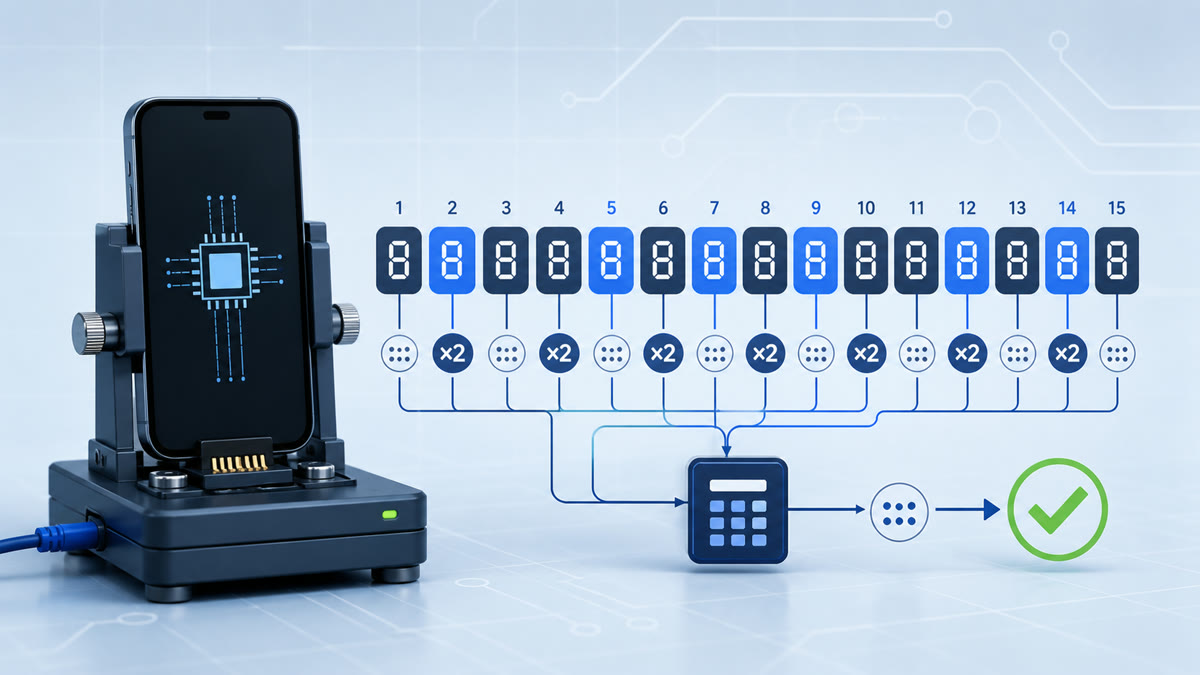
The Luhn algorithm is a modulo-10 checksum used for IMEIs and other identifiers. For a 15-digit IMEI candidate, apply this procedure.
Step 1 — Take the first 14 digits
The 15th digit is the check digit; you will compare against it at the end. Work with digits 1 through 14.
Step 2 — Double every second digit
Starting from the rightmost of those 14 digits and moving left, double every second digit. (Equivalently, double the digits in even positions counting from the left.)
Step 3 — Reduce two-digit results
If doubling produces a number greater than 9, subtract 9 (or add the two digits together — same result). So 12 becomes 3, 16 becomes 7, 10 becomes 1.
Step 4 — Sum everything
Add all the processed digits together: the doubled-and-reduced ones plus the untouched ones.
Step 5 — Compute the check digit
Find the next multiple of 10 at or above your sum, then subtract the sum. That result is the expected check digit. If it equals the 15th digit of your IMEI, the number is valid. If the running total is already a multiple of 10, the check digit is 0.
A Fully Worked Example
Let us validate the IMEI 35 824011 345678 4. The first 14 digits are:
3 5 8 2 4 0 1 1 3 4 5 6 7 8Double every second digit (the digits in positions 2, 4, 6, 8, 10, 12, 14 from the left — 5, 2, 0, 1, 4, 6, 8):
| Original | Doubled | Reduced |
|---|---|---|
| 5 | 10 | 1 |
| 2 | 4 | 4 |
| 0 | 0 | 0 |
| 1 | 2 | 2 |
| 4 | 8 | 8 |
| 6 | 12 | 3 |
| 8 | 16 | 7 |
Now interleave them with the untouched odd-position digits (3, 8, 4, 1, 3, 5, 7), keeping every digit in its original position:
3, 1, 8, 4, 4, 0, 1, 2, 3, 8, 5, 3, 7, 7Sum: 3 + 1 + 8 + 4 + 4 + 0 + 1 + 2 + 3 + 8 + 5 + 3 + 7 + 7 = 56.
Check digit: the next multiple of 10 at or above 56 is 60, so 60 − 56 = 4.
The computed check digit is 4, and the 15th digit of our IMEI is also 4. They match, so 358240113456784 is a valid IMEI. (This is the same walkthrough the calculator on the homepage performs server-side for every number it generates.)
QA vectors that separate format from identity
| Candidate | Format result | Interpretation |
|---|---|---|
490154203237518 |
Pass | Positive Luhn control; assignment unknown |
490154203237519 |
Fail | Check digit changed from 8 to 9 |
000000000000000 |
Pass | Demonstrates that Luhn does not prove identity |
49015420323751 |
Fail | Only 14 digits; check digit missing |
4901542032375180 |
Not an IMEI candidate | Sixteen digits require a separate IMEISV contract |
For reusable automated cases, download the CC0 JSON test vectors or read the developer contract and limitations.
Common Reasons an IMEI Fails Validation
Common causes of a failed format check include:
- Transcription error — a changed digit or many adjacent transpositions are caught by Luhn.
- Wrong length — 14 digits are missing the check digit; 16 digits must be parsed under a separate IMEISV contract rather than accepted by an IMEI validator.
- Hidden characters — a stray space, dash, or non-breaking space pasted from a spreadsheet. Normalize only whitespace, Unicode separators and ASCII hyphens; reject every other character.
- Not an IMEI at all — a serial number, MEID, or random string that was mistaken for an IMEI. A placeholder can pass Luhn, as the all-zero vector shows. Reject placeholders with an explicit business rule, not by treating Luhn as an assignment database.
Checking IMEIs at Scale
Validating one number is easy. Validating thousands — in a QA pipeline, a fraud-screening job, or a data-cleaning script — calls for automation. The logic is small enough to implement in any language. Here is the core Luhn check in JavaScript:
function isValidImei(imei) {
  const digits = String(imei).replace(/[\s\p{Z}-]+/gu, '');
  if (!/^[0-9]{15}$/.test(digits)) return false;
  let sum = 0;
  for (let i = 0; i < 15; i++) {
    let d = Number(digits[i]);
    // double every second digit from the right
    if ((15 - i) % 2 === 0) {
      d *= 2;
      if (d > 9) d -= 9;
    }
    sum += d;
  }
  return sum % 10 === 0;
}
Note the neat property: if you include the check digit in the sum and the total is divisible by 10, the IMEI is valid. That is the same rule, expressed in one line.
For structurally valid fixtures, the Random IMEI homepage can generate batches with prefixes from its dated, non-authoritative TAC snapshot. Export them only to isolated tests.
Validation and Generation Have Different Contracts
- Validating answers "is this existing number well-formed?" Use the IMEI validator.
- Generating produces new, valid numbers for testing. Use the generator.
QA teams use both: generate a batch of valid IMEIs as test fixtures, then confirm your application validates them correctly (and rejects the broken ones you crafted on purpose).
FAQ
How do I check if an IMEI is valid?
Confirm it is exactly 15 digits, contains only numbers, and that the final digit matches the Luhn checksum of the first 14. The quickest method is to paste it into the IMEI validator, which performs all three checks instantly.
What is the Luhn algorithm?
The Luhn algorithm (mod 10) is a checksum formula that detects accidental errors in identification numbers. For IMEIs it verifies that the 15th digit is mathematically consistent with the other 14, catching most single-digit typos and transpositions.
Does a valid IMEI mean the phone is genuine?
No. Validation confirms only that the 15-digit format and checksum are internally consistent. It does not establish assignment, model, ownership or blacklist status. Use an authorized status source for those questions.
Why does my IMEI fail validation?
The most common causes are a mistyped digit, the wrong length (14 or 16 instead of 15), or hidden spaces and dashes copied from another app. Strip everything except digits and re-check the length first.
Can I validate an IMEI offline?
Yes. The Luhn check is simple arithmetic that needs no internet connection or database. You can compute it by hand, in a spreadsheet, or with a few lines of code like the example above.
Is a 14-digit number ever a valid IMEI?
No. A standard IMEI is 15 digits. A 14-digit value is missing its check digit (it may be just the TAC plus serial). The 16-digit IMEISV is a separate variant that replaces the check digit with a 2-digit software version number.
Where can I get valid IMEIs for testing?
Generate them. The Random IMEI generator builds 15-digit values with prefixes from its dated local snapshot and correct Luhn check digits, so every output passes the structural validation described here. The prefix mapping is not an official device lookup.
Sources and further reading
Try our tools
Create Luhn-valid test fixtures or check the 15-digit format and checksum of an existing value.
Related Articles
What Is an IMEI? Structure, IMEISV and Luhn Limits
An IMEI identifies cellular equipment. Learn its TAC, serial and check-digit structure, how it differs from SIM identifiers, and what Luhn cannot verify.
What Is a TAC (Type Allocation Code)? IMEI's First 8 Digits
The TAC is the first 8 digits of an IMEI and can be mapped to an allocated device type through authoritative data. Learn how allocation and lookup differ.
Bulk IMEI Testing: Batches, Luhn Checks & QA Automation
Generate batches of up to 50 Luhn-valid test values with RandomIMEI.com, or build a local deduplicated generator for larger QA datasets.